Tuesday, July 21, 2020

A Brand's Guide to Unsplash: How to Unlock the Next Big Visual Marketing Channel

A Brand's Guide to Unsplash: How to Unlock the Next Big Visual Marketing Channel

Remarkable brands are more than a logo.

They are a collection of images and feelings and connections. (Often experienced through social media.)

Take Nike for instance. When you think of Nike, you likely see movement, you feel momentum. You associate Nike with getting things done. This feeling is reinforced by all their imagery and of course by the iconic swoosh logo.

With Skittles, you likely see rainbows, bright colors, and excitement. These are hallmarks of their commercials and their ads.

We associate brands with images and feelings because - as neuroscience researchers have found - our brains love to stitch thoughts together. One thought always brings other thoughts, especially if those thoughts are recalled at the same time over and over. That’s why seeing a brand in a certain context, again and again, trains our minds to think of that brand whenever we randomly see those things in real life.

Our perception of any brand is constantly being reinforced by the images we see … which is why visual marketing is one of the most powerful marketing tools out there.

And it’s why Unsplash is fast becoming a go-to place for brands to be.

In this article, we’ll dive into the Unsplash strategies working today and how you can make the most of this “blue ocean” channel. Keep reading to find out how to build and shift brand perception using visual marketing and Unsplash.

Let’s dive in.


The Real Power of Visual Marketing

There have been numerous studies showing the power of visual marketing for building brand recognition and awareness. We know that content with images is generally more engaging, gets shared more on social media and attracts more attention.

The visual component of most marketing strategies is usually aimed at commanding attention, stimulating curiosity, and prompting immediate action.

Yet, this visual marketing strategy that focuses on immediate gains is very limited. The real power of visual marketing is in creating branded associations and controlling customers’ perceptions of the brand.

As we know, human beings are highly visual, as multiple studies confirm. Consider these two numbers showing how much our brain relies on visualizations:

When we think, most of us picture things. We remember colors, shapes, and symbols. This is where the real power of visual marketing lies – building connections between what you think and feel and what you experience with a brand on social, web, etc.


How brands are using Unsplash as a new visual marketing channel

Unsplash is one of the best places to find free images … and one of the largest: it is used more than Getty, Shutterstock, and Adobe Stock combined.

Social media and marketing teams around the world use Unsplash for beautiful, free imagery.

But brands are finding a home – and real traction – through Unsplash also.

This has happened through organic posting and through paid advertising with Unsplash for Brands. Let’s talk about more about how organic and paid work with Unsplash.

Organic posting on Unsplash

As you might have seen, many brands are uploading their own curated photos to Unsplash, contributing great, free photography to the Unsplash system.

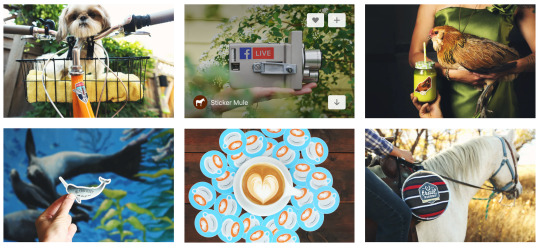
These photos, for instance, are by Sticker Mule.
A Brand's Guide to Unsplash: How to Unlock the Next Big Visual Marketing Channel

It’s completely free to upload these photos. The greatest part is that you’re giving back to the community and delivering value to photo-seekers. For your brand, you’re also reaping huuuuge benefits.

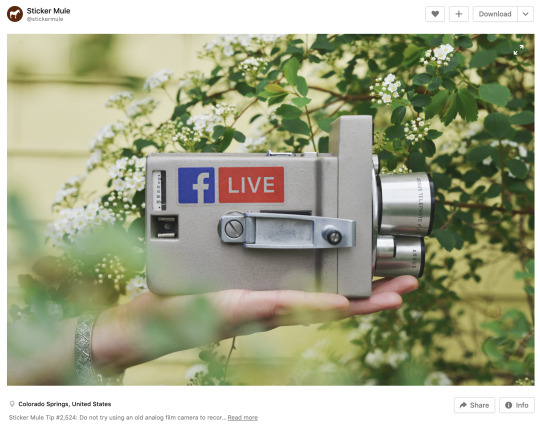
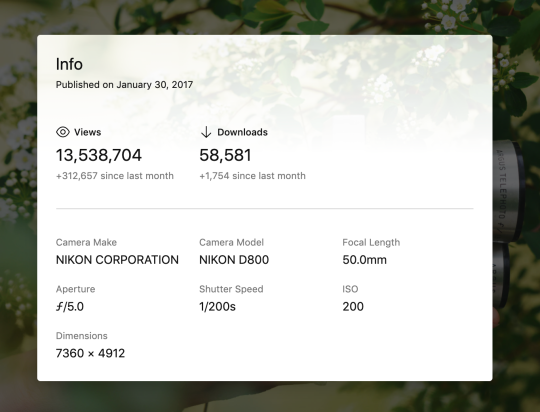
This photo from Sticker Mule …
A Brand's Guide to Unsplash: How to Unlock the Next Big Visual Marketing Channel

It’s been viewed more than 13 million times!
A Brand's Guide to Unsplash: How to Unlock the Next Big Visual Marketing Channel

Overall, the Sticker Mule account has 74 million views on just 15 total photos.

Sticker Mule is just one of many examples of brands doing unique, creative work on Unsplash and seeing huge results.

The furniture company Inside Weather has a very on-brand collection of images, featuring furniture pics that line up beautifully with the brand style on their website.

A Brand's Guide to Unsplash: How to Unlock the Next Big Visual Marketing Channel

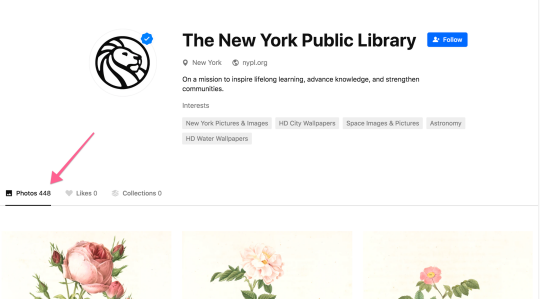
Brands like Sticker Mule and Inside Weather have a concise collection of photos to choose from (25 or fewer). And then there are brands like Morning Brew (a business newsletter) and The New York Public Library that have hundreds of photos on Unsplash.
A Brand's Guide to Unsplash: How to Unlock the Next Big Visual Marketing Channel

For additional inspiration, here’s a list of some brands and institutions doing great things on Unsplash:

Unlike numerous other advertising solutions out there, Unsplash offers a non-interruptive, unintrusive experience: Customers who are seeing branded images don’t have to interrupt their current browsing journeys, while publishers don’t have to compromise on their content quality.

Unsplash Advertising works in three steps:

  • Upload and publish your branded images to Unsplash
  • Align photos with important and relevant search terms
  • Syndicate the images to publishers and creators who use Unsplash to find creative photos that can be used for free in their content and social media channels

Sponsored images appear in the top-left of the homepage and search results. The photographer’s name and avatar show up by default (rather than showing up when you hover over the picture). When you do hover, a small “sponsored” label appears on the image.

A Brand's Guide to Unsplash: How to Unlock the Next Big Visual Marketing Channel

Does Unsplash advertising work?

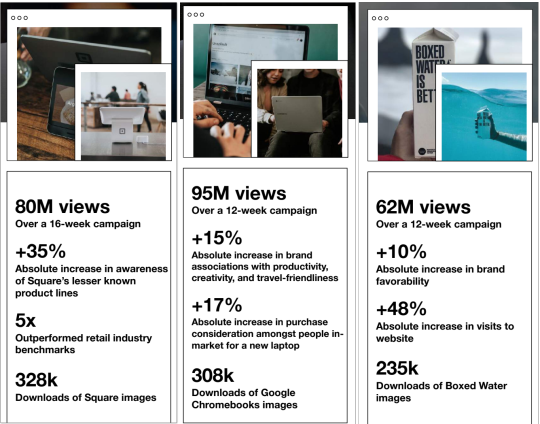
Unsplash advertising program is currently by invite only (you can apply here) but earlier case studies have shown tremendous success, so there’s definitely a huge potential here:
A Brand's Guide to Unsplash: How to Unlock the Next Big Visual Marketing Channel
Case studies from Square, Google Chromebook and Boxed Water. See their examples below.

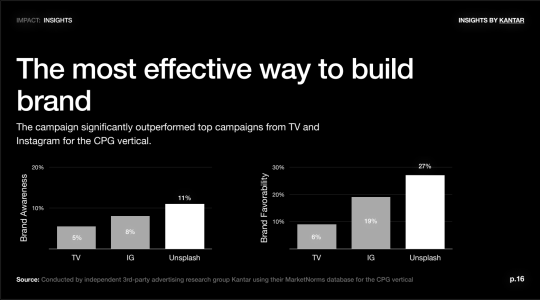
Aggregate results across these early advertiser case studies show Unsplash to be more effective at elevating how people feel about a brand – more effective than even digital, TV, and Instagram campaigns.
A Brand's Guide to Unsplash: How to Unlock the Next Big Visual Marketing Channel

Create Visual Content that Captures Your Brand Goals without Being Promotional

This is a fundamental step to creating an effective visual marketing:

  • Your images need to feature your product the way you want it to be perceived
  • At the same time, make sure your images are non-promotional and creative enough for publishers and social media users to want to use them on their sites and social media feeds

In other words, when crafting your visual marketing strategy, ask yourself the following questions:

  • Do my images capture my brand’s goals?
  • Are they good enough for people to want to use them?

The key focus here is in building organic imagery around the brand through providing branded visual content that is worth using.

To create high-quality branded photography, brands can choose to

  • Upload their own pictures
  • Work with creative photographers from the Unsplash community

A Few Examples of Unsplash-Hosted Campaigns

Boxed Water was interested in promoting the awareness of plastic bottle alternatives. It is know that plastic is the major pollutant of the environment, Boxed Water has focused on how sustainable their product is, as opposed to commonly used plastic bottles.

In order to build the perception of that contrast, most of their branded photography is outdoors featuring people in a perfect harmony with nature:

A Brand's Guide to Unsplash: How to Unlock the Next Big Visual Marketing Channel
Through branded photography Boxed Water showcases what plastic bottles lack: Sustainability, forest- and ocean-friendliness, pollution-free

Another Unsplash advertiser - Google Chromebook - was willing to become known as a creativity- and travel-friendly solution that is being used by younger generations, so they worked with Unsplash photographers to create pictures reflecting that perception:

A Brand's Guide to Unsplash: How to Unlock the Next Big Visual Marketing Channel
Chromebooks featured here are shown as creativity- and travel-related options for younger users. 

Another example is Square employing visual marketing to shift the audience perception from a very narrow concept of a mobile credit card reader to a broader one of a full-stack financial and merchant service provider.

The goal behind their campaign was to broaden the perception of the brand and capture the attention of small business owners who were not aware of the various business management and growth tools Square had.

Unsplash photographers were tasked to create pictures which would associate Square with business, entrepreneurs, payments, and stores:

A Brand's Guide to Unsplash: How to Unlock the Next Big Visual Marketing Channel
Square’s Unsplash photos feature the product in the wild, being used by small business owners and patrons

Notice how subtle the brand’s presence is in all the pictures, yet how hard it is to miss.

Tips for Creating Powerful Branded Photography on Unsplash

Unsplash has a detailed guide on how to create photography that gets noticed and used through the Unsplash platform, and all of those tips apply for brands, too:

  • Avoid being promotional or self-centered (don’t just post product pictures or selfies)
  • Pictures should be of high resolution with the minimum size requirement of 5 megapixels and 2500 by 2000 pixels (for a landscape picture)
  • Photos should be clear, creative, and original
  • Don’t use watermarks. Your brand identity needs to be a natural and subtle part of the context of the photo, not overlaid on it.

Tip #1: Post your photos around upcoming dates

When creating your branded photography, it is always a good idea to think of upcoming holidays, seasons, or notable dates. Timing your content strategy right is always effective (here’s a quick guide on doing that right).

Note: When planning a seasonal campaign on Unsplash, time everything carefully to upload photos at least one month prior to the holiday or the start of the season, as this when content creators start planning their articles too.

Tip #2: Align photos with important and relevant search terms

While the quality of the actual photography is fundamental to success, you also want those pictures to be discoverable.

Don’t forget that the real beauty of using the Unsplash platform is that it is used by content creators and social media influencers, and you want your branded photos to be found by them.

Unlike other visual advertising solutions (Instagram, for example), with Unsplash you won’t have to set your audience targeting: Your visual content and relevance settings define its visibility in a most organic way.

In other words, this step is where you are able to define who is able to discover your branded images and how wide your audience is going to be.

Tip #3: Use a lot of tags to get your pictures discovered by users & publishers

Unsplash does use automated tagging to help photos  be discovered but you need to also manually tag your images to ensure multi-purpose discoverability of your branded photos.

Here are some tips for properly tagging your branded photos:

  • List the objects within your photo (for example, “snow”, “water”, etc.)
  • Add symbolic and metaphorical tags that reflect what the photo is evoking. These should describe the mood and the atmosphere behind the picture (for example, “motivation”, “nature”, “solitude”)
  • Include tags for content creators to be able to find and use your pictures within their articles (for example, “work at home”, “hobby”, “marketing”, “sustainability”, etc.)
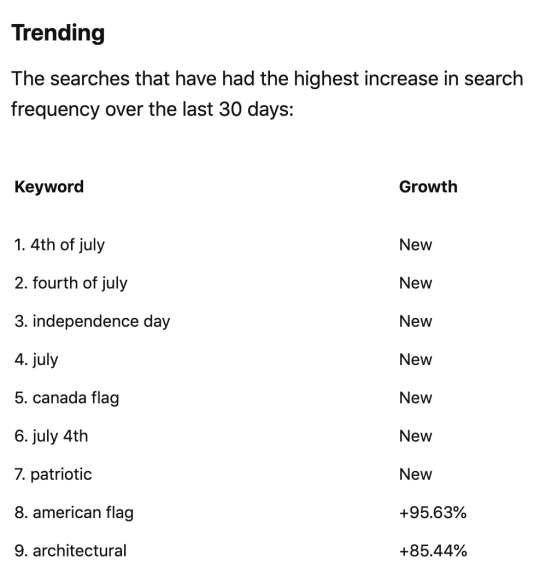
  • When possible, list trending hashtags. Unsplash helpfully offers a “trending search” section that shows which words have been typed into the Unsplash search box recently. It is also a good idea to keep an eye on that section and add tags to older photos when they are relevant to a current hot trend.

Here’s what was trending in July:
A Brand's Guide to Unsplash: How to Unlock the Next Big Visual Marketing Channel

To add tags to your photos:

  • Upload your picture and publish it
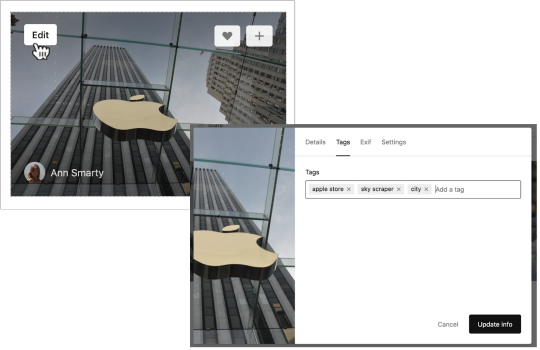
  • Go to your profile and hover over the picture
  • Select “Edit” and click to the “Tags” tab
  • Add your tags one by one:
A Brand's Guide to Unsplash: How to Unlock the Next Big Visual Marketing Channel

When I am stuck and cannot come up with more tags, I use semantic analysis to identify related concepts, brands and places. Here are semantically-related results for [skyscraper], for example:

A Brand's Guide to Unsplash: How to Unlock the Next Big Visual Marketing Channel

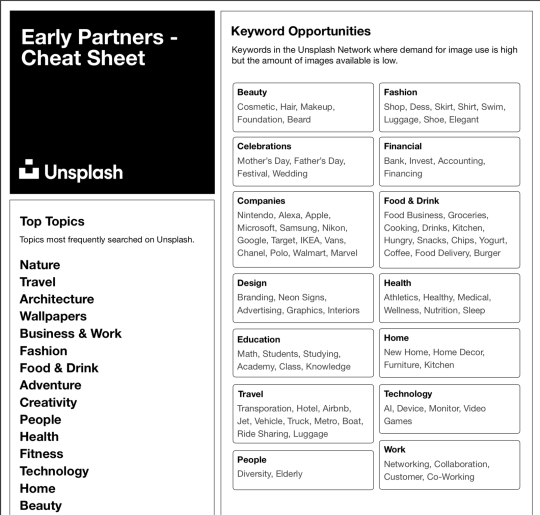
Additionally, here’s the list of popular topics and keywords that are searched on Unsplash, so pick those that make the most sense:
A Brand's Guide to Unsplash: How to Unlock the Next Big Visual Marketing Channel

Tip #4: Don’t forget to add captions

While tags drive visibility inside the Unsplash platform, captions will help expand your content reach even further.

Unsplash images are very well indexed in Google, and rank well in Google Images which is an important visual discoverability tool used by many content creators.

Thanks to its domain authority and high-quality of photographic content, Unsplash ranks incredibly well in Google, so hosting your branded visual content on the platform will also improve your brand’s organic visibility in both Google Images and generic Google search:

A Brand's Guide to Unsplash: How to Unlock the Next Big Visual Marketing Channel
Unsplash can bring your branded photos on top of Google for more exposure


Unsplash uses machine learning and image recognition technologies to handle much of its content search engine friendliness. For example, when you upload a photo of a seagull to the platform, it will automatically be named “Free Bird Image”.

So whether you apply any additional efforts or not, once you upload your branded photos to Unsplash, they will start ranking in Google quite well.

Yet, adding more text around the picture will be helpful in generating even more organic presence for your branded pictures. That being said, always add a descriptive 1-3-sentence caption to increase its odds of getting found in both Unsplash and Google.

Tip #5: Add the location information

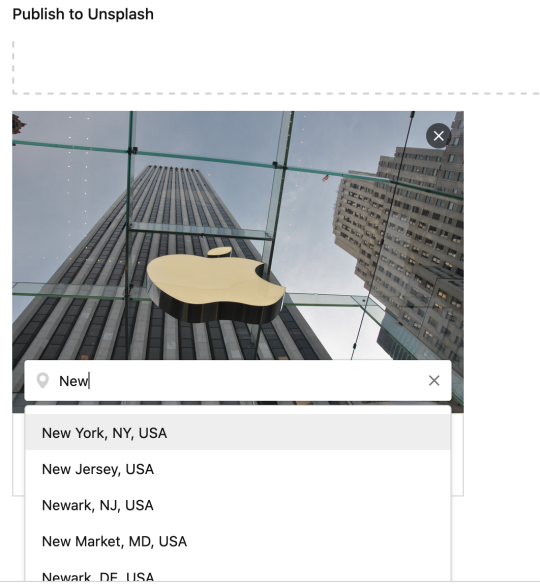
Finally, if your picture features a certain location, do add it. Location settings make your photos discoverable for location-based search queries. For example, when someone is searching for “NYC”, your picture labeled there will show up in search results.
A Brand's Guide to Unsplash: How to Unlock the Next Big Visual Marketing Channel

Tip #6: Syndicate the branded images to publishers

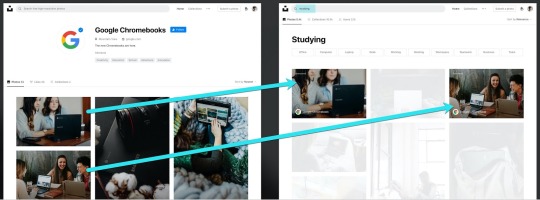
Once your branded pictures are uploaded and tagged, they will now be findable through Unsplash search results, just as regular pictures would, but labeled as “sponsored”:
A Brand's Guide to Unsplash: How to Unlock the Next Big Visual Marketing Channel

Unsplash has a huge community of photographers and content creators utilizing the platform to find free images for their articles, videos, and infographics.

A Brand's Guide to Unsplash: How to Unlock the Next Big Visual Marketing Channel

But the platform reach doesn’t stop there. By offering the free API for developers to use, Unsplash allows its users’ photos to be integrated into a variety of content management platforms and graphic design solutions, including:

Imagine your visual message to be integrated into all or any of those platforms.

The potential reach includes some best-known publications and media outlets including Buzzfeed and Medium, to name the few.

This means your branded creative photography will be unstoppable bringing your products in front of audiences across the web. Here are just a few headlines organically placing Unsplash advertisers in a highly relevant context on incredibly popular publications:

A Brand's Guide to Unsplash: How to Unlock the Next Big Visual Marketing Channel


(Notice the relevant context here: It is all about starting a new business angle that puts the brand’s product in front of the target audience, i.e. those that are looking to start a new business.)


Conclusion

Visual marketing plays a major role in influencing and swaying customers’ perceptions of the brand, and I find it pretty exciting that we finally get a visual marketing solution allowing brands to impact buyers’ buying decisions without forcing their branded imaginary on either customers or publishers.

It’s one of those innovations that promotes creativity and offers something for everyone. As Luke Chesser, Cofounder of Unsplash, put it:

Brands get impact, contributors get paid opportunities, and creators get more images to create openly with. It’s a win-win-win.


Thank A Brand’s Guide to Unsplash: How to Unlock the Next Big Visual Marketing Channel for first publishing this post.


Thursday, July 9, 2020

How to Pre-Launch on Instagram: The Inside Story of Jot Coffee’s Social Media Strategy

How to Pre-Launch on Instagram: The Inside Story of Jot Coffee’s Social Media Strategy

Launched in April 2020, Jot Coffee, a newly launched DTC (direct-to-consumer) coffee brand, has quickly picked up steam as the new at-home coffee brand that delivers an exceptionally delicious experience, both in-person and digitally. But how did they manage to generate so much interest and excitement for their launch?

Read on for a behind-the-scenes look at how Jot built excitement for its launch on Instagram and how to create a community from day one. You’ll hear directly from Jackie Modena, Director of Community at Jot, and you’ll learn:

  • Where to find inspiration for creating on-brand social media content
  • How to plan for a successful new brand or product launch on Instagram
  • How to generate pre-launch interest, UGC (user-generated content), and followers
  • How to engage with your brand’s community in a timely manner
  • How to stay up to date on social media trends and updates
How to Pre-Launch on Instagram: The Inside Story of Jot Coffee’s Social Media Strategy

This post is part of the #BufferBrandSpotlight, a Buffer Social Media series that shines a spotlight on the people that are helping build remarkable brands through social media, community building, content creation, and brand storytelling.

This series was born on Instagram Stories, which means you also have the ability to watch the original interview in our Highlights found on our @buffer Instagram profile.


Who are you?

Hi, I’m Jackie Modena! I’m with Jot, a newly launched DTC company that makes a first-of-its-kind 20x concentrated Ultra Coffee from fair trade, organic beans. All it takes is one tablespoon of our Ultra Coffee to create delicious, café-quality drinks at home, like iced lattes, americanos, and cappuccinos. We have a small but mighty (and highly caffeinated) team based out of Boulder, CO.

I’m Jot’s Director of Community, where I oversee the strategic direction of our social media, develop content, engage with and grow our community, manage influencer partnerships, and work closely with PR, performance marketing and customer service.

How to Pre-Launch on Instagram: The Inside Story of Jot Coffee’s Social Media Strategy

I’ve previously held in-house marketing and social media roles at other national CPG companies like Ripple Foods and ICONIC Protein, and prior to that, worked for a boutique PR agency that specialized in servicing natural & organic CPG food, beverage and lifestyle brands.

Where do you find inspiration for Jot’s social media content?

When we first started out with our social channels, we developed a set of creative guidelines to help inform the types of content, visual direction and aesthetic that we wanted to create.


We were also fortunate to launch with some amazing GIF, video and still content from an early creative shoot organized by our branding agency, Red Antler. Those assets really helped to set the foundation for the tone and visual direction of our social media. From there, it was easy to find content partners and curated content that fit our aesthetic. For inspiration, I follow relevant Instagram hashtags that either tie directly to our brand or to an aesthetic (ex. #coffeephotography, #coffeevibes, #morninglight, #lightsandshadows, etc.), look to other brand accounts (both competitors and other categories), and follow my favorite creator accounts for inspiration.

How does managing Jot’s social media account look like on a day-to-day basis?

I try to consolidate things as much as possible, so that I’m not bouncing around from platform to platform all day. That’s what makes Buffer such a great tool—I’m able to manage our Facebook, Instagram, Twitter and LinkedIn all in one place.

While we typically have ‘themes’ or overarching content initiatives that we plan six months to a year in advance, I only look to schedule content a few weeks out—and even then, I consider it a rough plan. Things can change so quickly, and it’s important to be able to pivot quickly and adapt to the landscape.

While we typically have ‘themes’ or overarching content initiatives that we plan six months to a year in advance, I only look to schedule content a few weeks out

From there, as it relates to Instagram, my day-to-day looks like the following:

  1. I’m checking in on UGC via our tagged posts and hashtags, and engaging with members of community who share their Ultra Coffee photos and recipes. We try to encourage customers to use #jotcoffee and #justonetablespoon, and we’re currently running a #summerofjot campaign.
  2. I’m checking in on stories and DMs throughout the day, to engage with our customers, re-share stories to our own story, and field any customer service-related questions that might come in.
  3. I like to keep an eye on the engagement on Facebook and Instagram ads, both to moderate any comments that violate our community guidelines and to answer questions from consumers who might be curious about our product.

How do you plan for a successful new brand or product launch?

As a marketer, brand and product launches are some of my favorite initiatives to plan, strategize and execute.

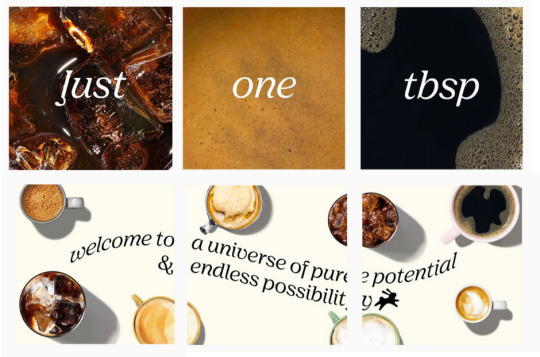
With Jot, when it came to Instagram specifically, we were careful to start curating our feed with on-brand, aesthetic content (and I think this can be a great time to utilize more ambitious grid-style posts that span 3-, 6- or 9-feed posts in size) leading up to our launch, without showing the actual product.

How to Pre-Launch on Instagram: The Inside Story of Jot Coffee’s Social Media Strategy
Jot’s pre-launch grid-style post that spanned 6-feed posts.

While we planned to have a presence on all the major social media platforms, we knew that Instagram was going to be a main priority for us and where we’d be dedicating a majority of our resources when it came to content, influencer and community.

To help generate pre-launch interest, followers and UGC, we launched a friends & family program in the weeks before our official launch, and encouraged participants to share their Ultra Coffee experience with us. This allowed us to start gathering early customer feedback and troubleshooting possible customer service and community questions.

To help generate pre-launch interest, followers and UGC, we launched a friends & family program in the weeks before our official launch, and encouraged participants to share their Ultra Coffee experience with us.

We also received a lot of great unboxing and other UGC content for social, which we started gathering and saving to ensure we’d have enough content on our launch day to really make a splash. Again, a tool like Buffer can be really helpful in this regard, because you can start to build up your content database and schedule out your launch day posts and stories (knowing how hectic launch days usually are, this can be a huge time-saver!).

In terms of other product launches I’ve worked on in the past for more established companies with an existing community, I think it’s fun to build anticipation with teaser posts leading up to the official launch. It gets the community engaged and involved and almost makes the launch into a game (you could even tie in a giveaway if someone guesses the correct new flavor/product).

What marketing/social media advice do you have for brands that are pre-launch?

I’d establish yourself on all the main social channels (and try to keep a consistent handle across all platforms) but figure out which channels are going to be your main focus.

For us as a DTC consumer product, it made sense that Instagram, and to an extent Facebook, would be an important part of our marketing strategy, so it was really essential that we nailed it on those platforms. We have more flexibility when it comes to posting cadence and strategy for our other platforms like LinkedIn, Pinterest, Twitter and TikTok, which allows us to be a little more experimental in our content.

When you’re a small startup, you’re only going to have so many resources—time, budget, manpower—to devote to your social channels, so invest wisely in your primary channels while maintaining relevant content on your secondary channels.

What’s your number one tip for engaging with your brand’s community?

Time is of the essence, so check in with your platforms of highest engagement frequently. If your priority platform is Instagram and that’s where you’re seeing the most engagement, you don’t need to necessarily be glued to Instagram all day but consider designating a few 15-minute chunks of time throughout the day as Instagram check-in time and even blocking your calendar as such.

Time is of the essence, so check in with your platforms of highest engagement frequently.

I do think it’s important to try and engage in a timely manner, whether it’s through DMs, a comment on a piece of UGC, or a comment on a post, because your followers are more likely to still be active on the platform and see your engagement.

I’ve also seen instances where follower conversations or questions can snowball in an unintended direction, or misinformation can be spread, if the brand doesn’t engage quickly enough with the community, so try to monitor and stay on top of conversations as they happen rather than being days behind and trying to do damage control later.

How do you stay up to date on social media trends?

I find that many of the social media scheduling and influencer platforms I utilize have fantastic blogs and email newsletters (including Buffer!) so make sure you’re signed up to receive their communications—they often have all the latest news & updates on the major social media platforms and trends in the space.

I have a few newsletters I’m subscribed to as well—The Hustle, Lean Luxe, and Morning Brew’s new marketing-centric newsletter, for a quick take on trends in retail, marketing and DTC businesses.

Finally, I’d recommend seeking out a few networking groups specific to your position or industry. I really like the Create & Cultivate and Women in Influencer Marketing Facebook groups—they’re a great way to share resources, ask questions, discuss ideas/approaches and meet others in the industry. Since conferences and trade shows are off the table at the moment, these kinds of groups can be a great stand-in for in-person networking opportunities and can lead to collaborating, brainstorming and sharing.

How do you take your Ultra Coffee?

My favorite everyday way to take my Ultra Coffee is in an iced latte—it’s as simple as 8 oz milk (I prefer Oatly Barista Style), ice, and a tablespoon of Ultra Coffee.

When I want to switch things up, I go for one of our new #summerofjot recipes: one tablespoon of Ultra Coffee, 6 oz water, one tablespoon fresh squeezed lemon juice, 1.5 tbsp maple, and ice – for a refreshing and unique Cold Brew Lemonade.

View this post on Instagram

Iced coffee season has officially returned. To celebrate, we’re hosting our first Ultra Coffee recipe contest. It’s as simple as whipping up your favorite iced or cold Ultra Coffee beverage, snapping a photo or video, and sharing it using #summerofjot. ⁣ ⁣ We’ll be selecting three winners by 7/3 to receive a three-month Ultra Coffee subscription (3x bottles, every 4 weeks). ⁣ ⁣ In addition, as part of our ongoing efforts to support the Black Lives Matter movement, for every entry received we’ll be making a $10 donation to @thelovelandfoundation, an organization that brings opportunity and healing to communities of color, and especially to Black women and girls.⁣ ⁣ We’ll be sharing some of our favorite iced and cold summer-ready recipes over the coming weeks, so keep an eye out if you need some inspiration. ⁣ ⁣ For more details, check out our #summerofjot stories highlight.

A post shared by Jot (@jot) on


We hope this interview with Jackie helps you get started with or double down on your social media efforts. You can follow her journey on Instagram here!

Have any questions for Jackie? Feel free to drop your question in a comment and Jackie, or someone from the Buffer team, will get to them as soon as possible.


Thank How to Pre-Launch on Instagram: The Inside Story of Jot Coffee’s Social Media Strategy for first publishing this post.

Friday, July 3, 2020

Why Transparent Email Stopped Working For Us and What We Do Instead

Why Transparent Email Stopped Working For Us and What We Do Instead

When I joined Buffer and opened my new Buffer email account for the first time, the email count read 200.  I was momentarily stunned.
That was way more emails than I’d ever had in one place before.

Usually, when you set up an email account at a new workplace, your inbox is empty at first – people don’t yet have your email address and you aren’t on a bunch of email lists. I was planning on those few days or weeks of email bliss, where your inbox is nearly always zero.

I had known about Buffer’s value of transparency at work and about our practice of email transparency, but what I hadn’t realized was that sometimes the benefit of transparency can become a burden. That’s what was happening with transparent email.

Here’s why transparent email stopped working for us, and what we switched to instead.

Why transparent email wasn’t working for us anymore


Six years ago now, we shared a blog post detailing the exact workflows we used for transparent email. At the time, we wrote:

Our value of transparency extends all the way to the inbox. Every email is public within the team. Every bit of communication gets shared. Everyone knows everything. There are no secrets.

The idea is a sound one, and transparent email did solve a challenge for us. A lot of communication was happening via email, and we wanted everyone to be able to see emails transparently. Having specific email lists that we cc’ed or bcc’ed (click on that link above for more on that system) was a much more efficient way to work than to add each teammate individually.

So what stopped working?

We grew to a larger team size

The purpose of transparent email was to see conversations happening across any team and have all of the context you needed. It worked well for us when Buffer was a team of fewer than 30 people, but around and past that time, it started to get a little bit out of control. By the time we reached a team of over 80, transparent email was no longer easy to keep up with purely because of the volume.

If you look at it from a relationships standpoint, the formula for possible relationships means that at 80 people there were 3,160 possible relationships. Of course, every individual wasn’t always speaking with every other person at the company, but still, that’s a huge number of possible relationships to be communicating via email.

It put the burden of staying informed on the individual

Receiving several hundred emails in a week was a huge burden for teammates. They needed to leverage email to stay informed, maintain a system, and figuring out which conversations were relevant, and we placed that burden on individual teammates, rather than making a change at an organizational level. Teammates became responsible for keeping track of all internal conversations, while at the same time email was still a place for external conversations to come in as well and it was a lot to juggle.

On top of that, the feeling that I had opening my Buffer email for the first time happened to a lot of new teammates, and that wasn’t a great experience.

Filters didn’t always work

The best solution to that level of email was to create lots of filters to sort and organize all internal conversations based on the internal email address that was being cc’ed.

Having so many filters set up sometimes meant that people would miss out on emails that mentioned them, which isn’t a great result, but we spent a lot of time and energy trying to make these filters work with transparent email.

We created several detailed internal best practices documents filled with different systems for setting up filters and managing email. Our CEO, Joel Gascoigne, even outlined a project for an internal email tool, he wrote:

Email at Buffer is a little like the Wild West. With transparent email, the number of emails we individually receive as a 30 person team could be 5 or 10x the amount someone in a normal 30 person team would receive.

So we built an internal tool for email called Buffmail.

The result of all of this work was more work. Teammates needed to spend more time setting up filters and tweaking them when new teams were created or projects were kicked off. In the end, the issue wasn’t that we weren’t doing transparent email properly, it was that we had outgrown this system and needed to look for a new one.

Our new system for transparent internal communication


In the words of our Director of People, Courtney Seiter, we needed a tool to help us have “calm, deliberate and timezone-inclusive conversation and decision-making at Buffer.”

In addition to decision making, we wanted a space for work-related announcements and discussion in the form of longer, asynchronous conversations.

Our solution: Threads

We’ve mentioned Threads before as it’s a staple in our asynchronous communication. Threads makes it easy to have text-based conversations across the company and clearly mark decisions when they are made. It also works well with Slack; new Threads can be cross-posted to a linked Slack channel, which is a nice benefit.

Why Threads works for us

Threads is a much less overwhelming way for 90 people to communicate. It’s easy to skim a Space (that’s the Threads name for a specific area) to see if there’s any conversation you want to drop into, and there’s also a helpful button to mark something as follow up.

It’s also less likely that someone will miss a Thread that mentions them because of Threads’ notification system. Threads helps take the burden of staying informed off of the individual. If someone needs to be looped in, it’s easy to tag them, and if someone wants to skim a space, they can do so without getting alerted to every conversation.

How we set Threads up


In Threads, there are different “Spaces,” and anyone in that Space will see all of the Threads (discussions) created there.

We’ve set up Threads to have Spaces that everyone should be a part of, and other, optional Spaces depending on a teammate’s team and location.
Here’s how we’ve set up our Spaces:

Team Spaces

Any space that starts with “Buffer-” is intended for all teammates to permanently join with notifications on. For us, these spaces are:

  • Announcements: For team-wide announcements
  • Inclusion: To discuss diversity, equity, and inclusion
  • Joel’s Memos: For thoughts from our CEO
  • Recognition & Praise: For celebrating and recognizing teammates
  • Retreat: For retreat info
  • Time-off: For vacation plans and time off
  • Town-Hall: An asynchronous space for town-hall questions for our CEO and leadership team
  • Updates: For area updates

Area Spaces

Each Area has its own Space with the naming convention Area-AreaName, e.g. Area-Marketing. These Spaces are intended only for those who work daily in that area to join. Teammates can view any Area Space anytime but we ask that they view only and not join any area they don’t work in directly. We do periodic cleanups to help stick to this guideline.

Project Spaces

We have a small number of Project Spaces with the naming convention: Proj-ProjectName, e.g. Proj-Pricing. These are for projects that touch many different teams and have a finite end date.

Geographic Spaces

We have several geography-related Spaces, e.g. Geo-UK and Geo-Canada, for discussion about the Buffer teammate experience specific to those countries.

Help Spaces

We have two help Spaces, Help-People and Help-Tools. Help-People is for questions or help around things like benefits, moving, and other life changes. Help-Tools is for when a teammate needs help with any of the tools we use at Buffer.

When we make new Spaces

To avoid having too many Spaces, we currently default to trying to write a Thread in the best-fitting Space before creating a new Space. If after that is given a try it still feels like this topic needs a new Space, then we’ll create it.


We’ve been using Threads for over a year now and are still feeling like it was very much the right decision and choice to move away from transparent email. If you liked this blog post, check out this post where we talk about asynchronous communication and why it’s so important for remote work.


Thank Why Transparent Email Stopped Working For Us and What We Do Instead for first publishing this post.

Monday, June 22, 2020

Buffer Is Moving to a 4-Day Workweek for the Rest of 2020

Buffer Is Moving to a 4-Day Workweek for the Rest of 2020

In May, our entire team experimented with a 4-day workweek. The intention of this experiment was to help us all manage the stress and changes to routine caused by living through a global pandemic.

We initially rolled out the 4-day work week experiment for only one month, with the main goal of reducing teammates’ stress. Happily, both survey results and anecdotal stories tell us that this was a success.

After examining survey data and anecdotal feedback and chatting with the team, we’ve decided to conduct a long-term pilot of the 4-day workweek through the end of the year. Here’s more on how we came to that decision and our next steps.

The results from our 4-day workweek experiment

Our main goal with this experiment was to help the team manage stress and changes to their routine caused by COVID-19. To measure whether this effort was successful, we polled the team at the beginning and end of the month and asked about their autonomy, stress level, and overall work happiness.

Here are the results from our team surveys showing differences between early May and late May:

  • We saw higher autonomy: 4.3 → 4.5
  • We saw lower stress levels: 3.3 → 2.7
  • We saw higher work happiness: 3.9 → 4.2

*These numbers are all out of 5.

These results are only part of the picture. We also asked teammates for written feedback and anecdotal stories about their experience. We received lots of both that supported these results. One teammate shared that they felt this experiment was helping them feel focused:

This last month has been incredible when it comes to finding more time to look after myself. I feel a lot more productive when it comes to the work I do and the creeping feeling of burnout towards the end of the week has gone completely. If anything I find myself more focused than I’ve ever been.

And another shared feelings of motivation and more collaboration:

General sense is that everyone has been feeling more motivated, energised and excited about the work we’re doing. We’ve also had more “ad-hoc improvements” with folx jumping in to add more monitoring, refactoring and improving our services. There was also more cross-team collaboration and more async activity on Threads and Slack.

It wasn’t completely smooth for all teammates, of course. We also heard a few challenges:

Since the biggest confusion to me was trying to remember/juggle who was off when, it would be great if we could decide on a particular day that we all take off.

Another challenge was around holidays (more on that below):

Due to a lot of public holidays during May, it meant that week to week it would often change as to who was taking what day off.  Folx appreciated having some flexibility in what day to take off, but it did result in a lot of deviations from the planned Wednesday off.

Because the 4-day workweek experiment was designed to give temporary relief to teammates during an especially hard time, we did not set goals around productivity or results during the one-month trial. In fact, we expected a tangible drop in productivity due to reduced hours.

So we were happily surprised when many teammates shared that they felt their weekly productivity was not all that different, and that their quality of work was higher due to increased rest and extra focus.

The one unique case here was our Customer Advocacy team. Because their style of work is heavily based on responding to customer queries, they may be an exception to the idea that fewer hours could result in similar productivity. Our VP of Customer Advocacy is leading separate discussions with this team around productivity and wellbeing in a 4-day model to see how they can make this shift work longer-term.

Why we decided on a 6-month pilot

Based on the results of the trial, we decided to start a more thorough pilot of a 4-day work week that focuses not just on teammate well-being but also on Buffer’s long-term success.

As a company we have a history of bold experiments, like being 100% distributed, having transparent salaries, and trying self-management. When testing out these new and bold ideas, we ask ourselves whether we are able to set and reach ambitious goals, deliver a high-quality experience for customers, grow our revenue, and make our mark on the world.

Some of those big experiments, like transparent salaries and remote work, have been a success because the answer to those questions was a resounding yes. For others, like self-management, the answer was no, and so we pivoted away from the experiment.

We’d like to seriously consider moving to a 4-day work week long term, so shifting to a 6-month pilot gives our team enough time to truly adapt to the concept so we can get more data on how this impacts team productivity and well-being in the long-term.

Next steps for this pilot

In order to truly evaluate whether a 4-day work week can be a success long-term, we need to measure productivity as well as individual well-being. Teammate well-being was our end goal for May. Whether that continues, and equally importantly, whether it translates into customer and company results, will be an exciting hypothesis to test.

We’re also keen to iterate on our current format and develop a more consistent approach. For the past six weeks, the 4-day concept has been implemented differently across teams and even individuals. Some teams took Wednesdays off and some took Fridays or Mondays off. This was fine for a short time, but in this longer experiment will likely feel a bit chaotic. We’ll be asking our teammates to help us define what a reduced-hours workweek looks like across a distributed team.

We also still have several elements to figure out.

  • In our initial iteration of the experiment, we didn’t account well for holidays. We eventually decided that if a holiday already makes it a 4-day workweek, then the rest of that week can be considered a normal week. We’ve since heard that this could be disruptive for teammates. Some teams had Wednesdays off but if there was a holiday on a Monday they had a Monday off instead. We aren’t sure yet what our solution will be to this long term, and it’s something we’re keen to figure out.
  • We also need to figure out how a 4-day workweek can be a success for our Customer Advocacy team. As much of their work revolves around interacting with customers and resolving tickets, taking additional days off has impacted both their productivity and the volume in our customer service inboxes.

We have an all-hands meeting at the end of this month where we’ll host breakout sessions asking teammates to help brainstorm how we can make the 4-day work week successful long-term, with a particular lens for what the Advocacy team is experiencing.


This is just the beginning of a fun new journey for us. We’re excited to share what’s next and what we learn as we test the boundaries of how work happens.


Thank Buffer Is Moving to a 4-Day Workweek for the Rest of 2020 for first publishing this post.

Thursday, March 19, 2020

Social Media Management in Times of Crisis

These are times of fast-changing news around COVID-19. It’s clear that what we are facing — not just as marketers, as friends, and parents and colleagues — is unprecedented. And we’re all in it together.

In times like these, people look to each other, and to their communities to figure out how to respond. Over the last, 9 years, we’re very grateful to have built up such a strong community of people who use our products, read our blogs and listen to our podcast, and we believe that it’s important that we all try to navigate these challenges together. That’s why we want to share these thoughts with you. Sometimes, it’s best to just start a conversation.

Last Thursday (March 12, 2020), as a team, we took a moment to stop and reflect. We paused our Buffer queue, as what seemed like a great and timely posts a few days ago, now felt a little irrelevant. We gathered together and we discussed what the COVID-19 situation means for Buffer, for our teammates and those closest to us, and our customers — and we’re still figuring this out.

Social media is such an important communication tool in 2020, and we know as we all try to navigate unexpected and unprecedented challenges, many of your customers and teammates will turn to social media for some form of support. And as many around the globe isolate, social media might become an even more important channel for communication and a sense of community.

So what does social media management look like over the coming weeks and months? We’re still figuring it out.

We hope that the below thoughts can act as a starting point to work from as we navigate the current and up-coming challenge.

This isn’t an opportunity

The first thing to say is that this isn’t a marketing opportunity. Brands shouldn’t be looking at the COVID-19 pandemic as something to capitalize on.

However, even though it’s not quite business as usual — every post, campaign and ad you run will need an added layer of care and empathy over the coming days and weeks — it is okay to continue to market and sell your product or services, we know for some businesses not selling products can impact the livelihoods of some of their teammates. Just don’t use COVID-19 as a platform to self-promote. 

Pause and reconsider your social media plans (and goals)

If you haven’t already, now is a time to reflect on any existing plans for the end of Q1 and heading into Q2.

Many campaigns and pieces of content you had planned might be better saved for another time. We recommend rethinking your content and social media plans to tailor them to the changing needs of consumers right now.

On Monday (March 16th), we were due to launch a new, updated version of our podcast, The Science of Social Media. We had a new episode lined up, new artwork, creative and more. But we felt it wasn’t the time “celebrate” something new so we hit pause on that temporarily to focus on the more immediate needs of our customers and our audience. (We still plan to launch the new style podcast in the next week-or-so, but the launch might look a little different.)

It’s also a good time to reflect on any goals you had for the coming months as priorities may need to change. For example, new customer acquisition goals might shift towards a focus on customer retention and support.

Now is a good time to take a look at the bigger picture and what social media means to your business in a time of global crisis.

If you decide to keep some campaigns or content paused and find yourself with a few spare hours that would have been spent on content creation, promotion or analytics, now could be a good time to focus on some of the social media tasks that aren’t directly customer facing like a social media audit. 

Is your company able to help

You never want to shoehorn your brand into a conversation in which it doesn’t belong. And most brands don’t belong directly in the COVID-19 conversation.

But that said, almost every business globally will be impacted in some way by COVID-19, and there might be some small things your business can do help in these moments.

At Buffer, we’ve been a remote-first company since the start, and with many businesses and workers being forced to go remote for the foreseeable future, this felt like the best place for us to help.

So after a brief pause last week, we decided to focus this week on how we might be able to help people adjusting to remote work:

Hailley also jumped into our remote work guide to freshen it up and ensure it includes all of our most useful remote work resources. 

Outside of Buffer, Common Thread Collective doubled down on sharing data and insights into how it the pandemic is affecting its brands and how it’s responding:

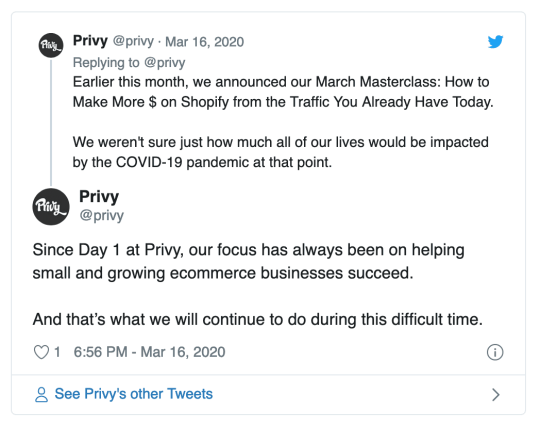
At a time when eCommerce business might be cutting back ad budgets, Privy hosted a webinar focused on making the most from your existing traffic: 

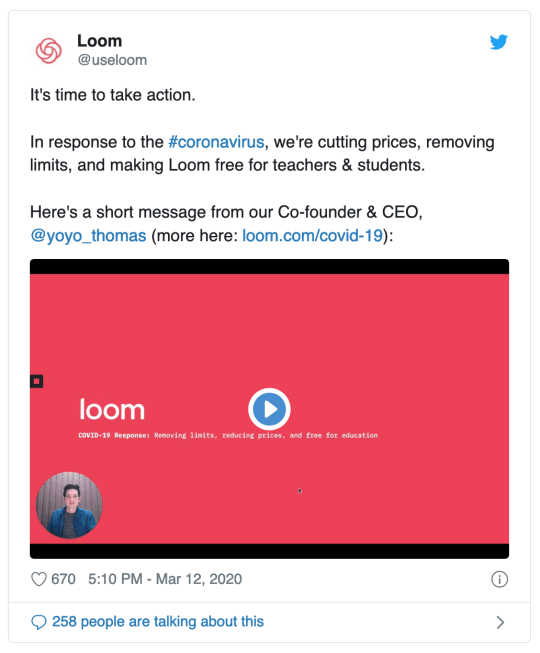
Loom made changes to its platform to help students and teachers: 

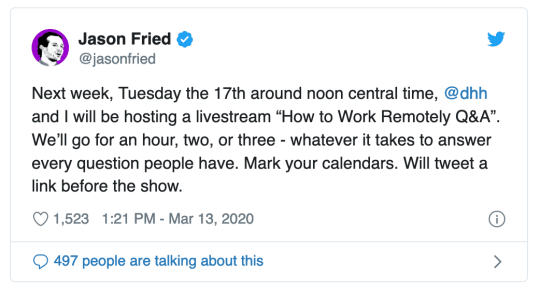
And Basecamp’s co-founders hosted a Q&A about remote work: 

Over the coming days and week, ask yourself: What role does your brand play in this situation?

(And it’s completely fine if feels like there’s nothing. Don’t force it.)

Think clearly about the unique role your brand plays in people’s lives. If you’re an entertainment brand, maybe your audience could do with a fun distraction, like Disney releasing Frozen 2 early

If you’re a travel company, dealing with support might be more of a priority, so you could try to proactive about questions from your audience and give clear directions on what’s happening. 

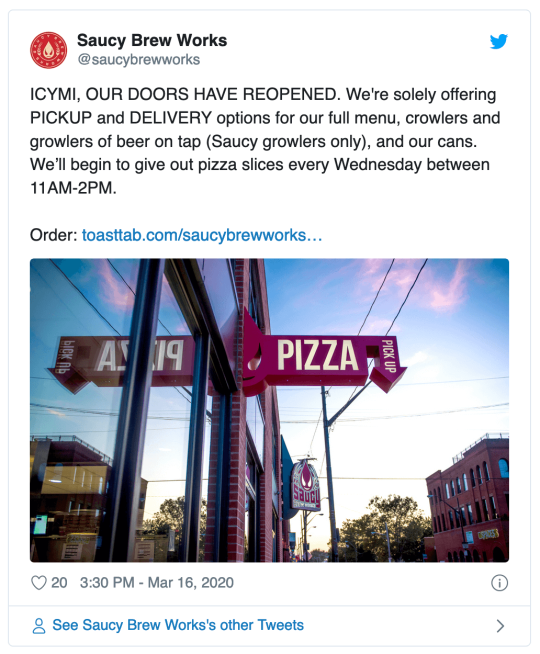
And as a local business, it could be helpful to simply share your opening hours or how you’re being affected by what’s going on. Saucy Brew Works, a brewery and restaurant in Cleveland has been keeping its followers regularly updated with open hours and updates:

Communicate clearly with customers

It’s almost always better to over-communicate than under-communicate. Especially in times of crisis.

If you’re closing your office and the team is working from home and it isn’t impacting your customers, that might not be something you’d want to communicate. If your team shifting to remote work will impact customer service response times, or delivery times, that is something worth sharing.

With so many companies impacted consumers are getting much more communication than usual from the brands and companies that they engage with, make sure that the information you are giving them is empathetic to that and focused on conveying only key messages.

When it comes to figuring out what to say when you put out a message over the coming days and week, the details matter. Strive to make all communication clear and relevant, and avoid making assumptions and share decisions early to give you customers as much time as possible to react.

Delta airlines has been great at communicating with its customers on social media over the past week-or-so. Its CEO, Ed Bastian, turned to LinkedIn to keep customers informed

And Delta has also been sharing some additional information and context across its social channels, such as how air filtration systems work on its planes. This is a great example of over-communication that is relevant to customers who may be traveling during the crisis.

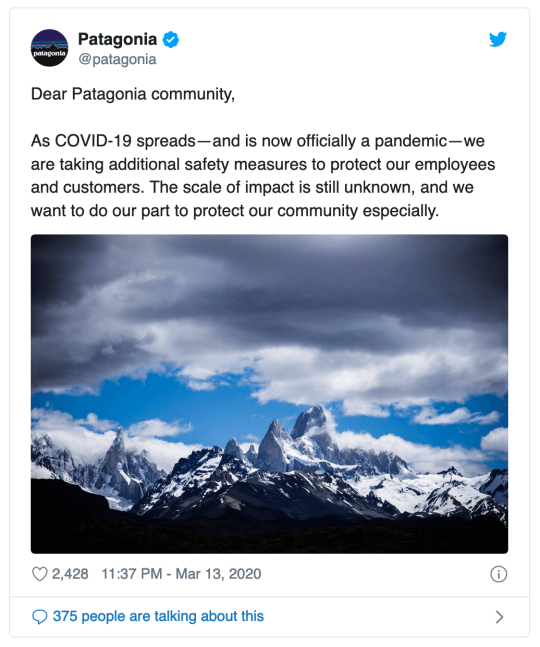
Patagonia made the decision to close its retail stores on Friday, March 13, 2020:

In its announcement, Patagonia made sure to over-communicate and provide customers with plenty of information about how it is dealing with COVID-19. In the Twitter thread sharing the announcement about its retail stores closing Patagonia told its customers:

  • We will temporarily close our stores, offices and other operations at the end of business on Friday, March 13, 2020.
  • Employees who can work from home will do so. All Patagonia employees will receive their regular pay during the closure.
  • We apologize that over the next two weeks, there will be delays on orders and customer-service requests.
  • We encourage our friends everywhere to take the extra precautions necessary to safeguard their health and that of others.

The message could have simple been “We’ll be closing our retail stores at the end of business on Friday, March 13, 2020 — but taking the time to over-communicate, and share more than it needed to, helped Patagonia to assure it’s customers that is was doing all it could for them, and to support the company’s employees.

(This Twitter thread started by Matthew Kobach has more examples of brands communicating clearly during this on-going crisis.)

Support and keep your team informed 

Work will look a little different for all of us for a little while, and it’s great to embrace the concept of over-communication with your team as well as your customers.

In times of crisis, it’s important to keep in close contact with each member of your team and set some expectations around what work might look like over the next few weeks or months.

As people adapt to new working practices productivity might not be at its usual levels, and it’s important to let your team know how your company plans to deal with the effects of COVID-19 and the new work environment.

Here at Buffer, our Director of People, Courtney Seiter, and CEO, Joel Gascoigne, shared updates with us last week on COVID-19, Buffer and how the next little while might look for the team. We also have a temporary, and very optional, Slack channel where teammates can chat, share news, resources and support each other at this time. As a remote team, we’ve also been making extra effort to connect with each other for impromptu chats and get togethers, too. 

There’s still a lot going on to figure out but it feels incredibly important for company leaders, and teammates alike, to be pro-active supporting their teams and each other. 

Further resources on crisis communication and social media management

Here are a few resources we’ve found helpful for thinking about social media and communication strategy at this time:


Thank Social Media Management in Times of Crisis for first publishing this post.